

DAPI
When HR changes, access changes with it.
DAPI links your HR processes to Active Directory so joiners, movers and leavers are provisioned, updated and deactivated through automated, auditable workflows, with less manual work and less risk.

What is DAPI?
In most organisations the HR record and the Active Directory account are managed by different teams, in different tools, at different speeds. New starters wait for access, role changes leave old permissions behind, and leavers' accounts stay active longer than they should.
DAPI is an enterprise automation solution that connects HR processes with Active Directory account management. When something happens in the employee lifecycle, DAPI drives the corresponding directory action through a defined workflow.
That means faster onboarding, accurate access throughout an employee's time with you, and a clean, auditable offboarding.
The problems it solves
Manual identity administration is slow, inconsistent and hard to audit.
Slow onboarding
New employees wait for accounts while requests move between HR and IT.
Access that doesn't follow role changes
Transfers and promotions leave old permissions in place or new ones missing.
Leavers' accounts linger
Offboarding depends on someone remembering to disable accounts promptly.
Little visibility or audit evidence
It is hard to show who changed what, when and on whose authority.
What it does
The full employee lifecycle, connected to the directory.
Employee onboarding automation
Start the account process automatically when a new employee is recorded by HR.
Active Directory account provisioning
Create and configure accounts in Active Directory according to your rules.
Employee information updates
Keep directory details in step with changes made in the HR record.
Department and role changes
Reflect transfers and role changes in the directory so access follows the person.
Employee offboarding
Run a consistent offboarding process when an employee leaves.
Account deactivation
Deactivate accounts promptly and consistently as part of offboarding.
Workflow automation
Define the steps and approvals that sit between an HR event and a directory change.
Security and access management
Apply consistent, rule-based access instead of ad-hoc manual changes.
Auditability
Keep a record of what was done, when and why, to support reviews and audits.
Why it matters
Faster, smoother starts
New employees get what they need sooner, with less back-and-forth between teams.
Accurate access over time
Role and department changes are reflected so access matches responsibilities.
Cleaner offboarding
Accounts are deactivated through a defined process rather than by memory.
Audit-ready by default
Every action is recorded, supporting internal and external reviews.
Operational efficiency
Less repetitive administration for HR and IT teams.
How it is put together
HR events enter DAPI, which applies your rules and workflows and performs the matching actions in Active Directory, recording every step.
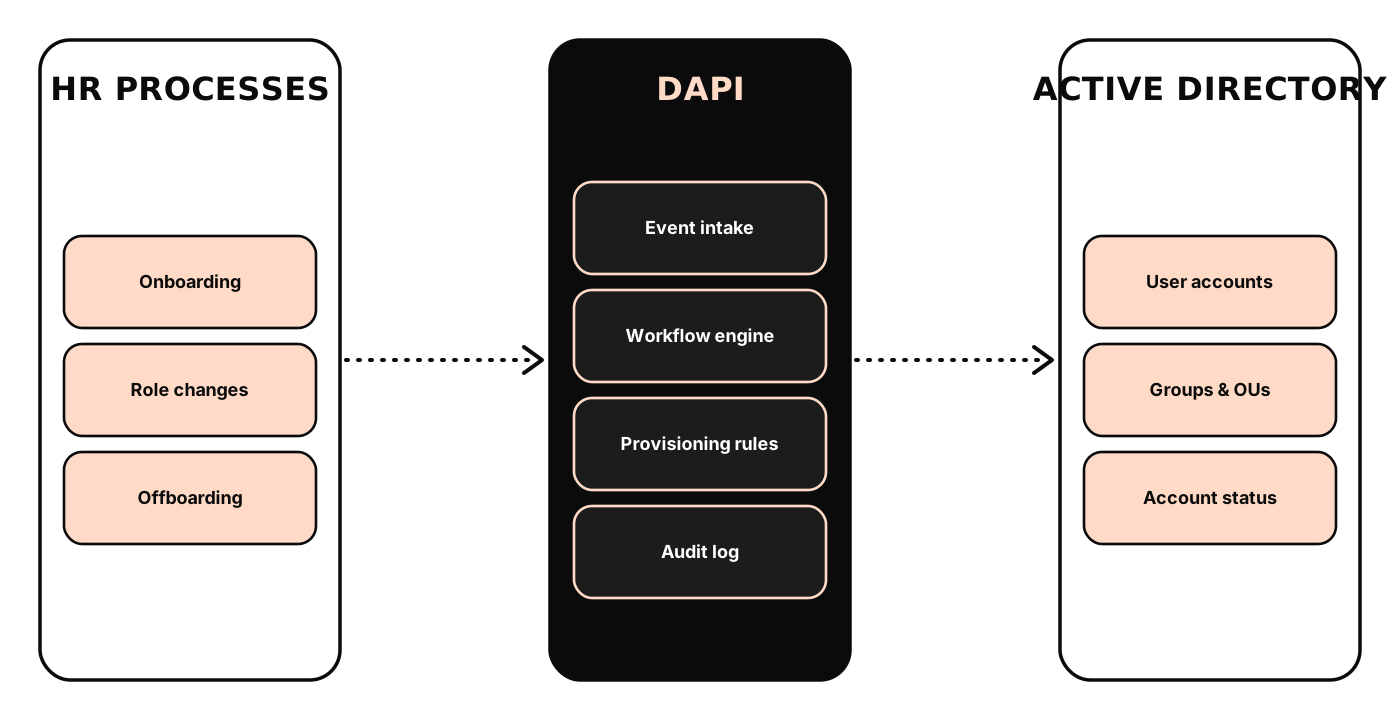
HR processes
The employee lifecycle events that drive identity changes.
Event intake
Receives HR events and validates them before action.
Workflow and rules
Applies your provisioning rules and approvals.
Active Directory
The directory where accounts and access are managed.
Audit
A record of every action taken.
How it works, step by step
From an HR event to a completed directory action.
HR event recorded
A joiner, mover or leaver is recorded in the HR process.
DAPI receives the event
The event is validated and matched to a workflow.
Rules and approvals apply
Your provisioning rules run and any required approvals are collected.
Directory action performed
The account is created, updated or deactivated in Active Directory.
Recorded for audit
Every step is logged for review and reporting.
Where it fits
Onboarding at scale
Provision accounts consistently for new employees across departments.
Internal transfers and promotions
Keep access aligned with the employee's current role.
Controlled offboarding
Disable accounts promptly and consistently when employees leave.
Access review support
Provide a clear record of identity changes for internal and external audits.
See the experience
Illustrative interface mock-ups that show the kind of views and workflows the product provides.
Built to fit your environment
Identity automation touches access, so control, approvals and traceability are central.
Rule-based access
Apply consistent provisioning rules instead of ad-hoc changes.
Approvals where needed
Include approval steps for sensitive changes.
Full audit trail
Record every action for review, reporting and audits.
Active Directory
Provision and manage accounts, groups and status in your directory.
HR process connection
Driven by events from your HR process, with the approach agreed during discovery.
Workflow configuration
Adapt steps and rules to your organisation's policies.
| Focus | Automating the link between HR processes and Active Directory account management |
|---|
| Lifecycle events | Onboarding, employee updates, department and role changes, offboarding, account deactivation |
|---|---|
| Workflows | Configurable workflows and provisioning rules |
| Audit | Recorded history of actions taken |
| HR source and directory | Confirmed during discovery for your HR process and Active Directory environment |
|---|---|
| Implementation | Configured and deployed per engagement |
Questions we hear most
What does DAPI automate?
Does it replace our HR system or Active Directory?
Can we require approvals?
How does it help with audits?
Can we see it in action?
Often used together


See DAPI in your context
Tell us about your environment and we'll show you how DAPI would fit, or talk through the options with an engineer.
Descriptions on this page are conceptual. Exact deployment options, integrations and specifications are confirmed with you during discovery.